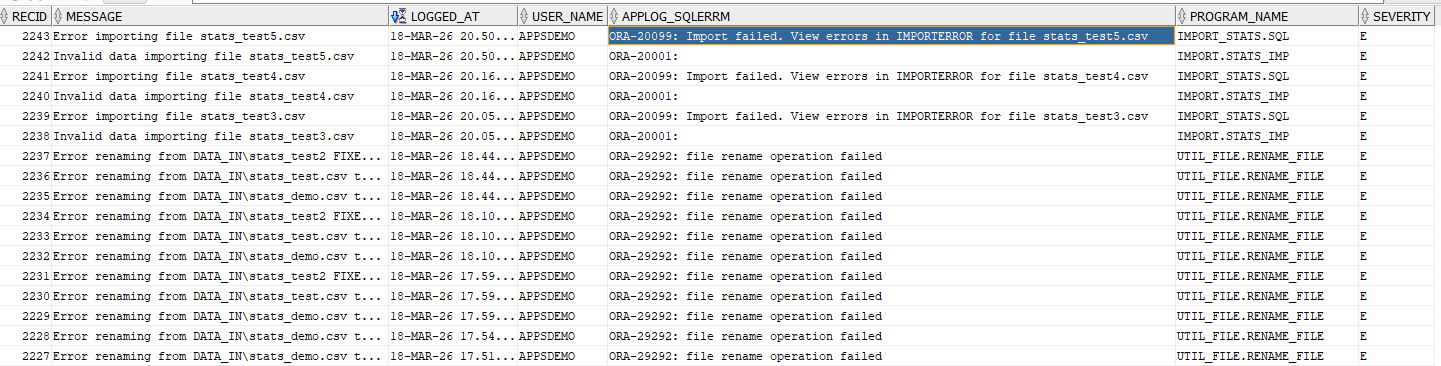
The log_message PL/SQL program is used to display information, warning, and error messages to the application users. These messages may be displayed on the screen, written to a log table, or both.
The program has a mode that allows messages to be switched off, which is extremely useful when developing and debugging applications. You can embed debug messages in your programs for use during development, and switch those messages off with a single switch when deploying into production. An example is provided below.
Almost every program you write will benefit from using log_message, so it is a great example of the sort of program you need to write early on to save time and effort.
This is a perfect example of the benefits of using packaged procedures: You can write a single piece of code to perform a task that needs to be carried out by many other programs. In addition to saving time and effort, maintenance is simplified; If you want to change the format of the messages, you just need to amend a single packaged procedure.
The log_message program uses two database tables:
- APPLOG table is used to record messages,
- APPSEVERITY contains severity codes, typically Information, Error, and Warning.
The Data Definition Language script for creating the schema objects is available here:
 GitHub Repository - DDL
The severity codes are maintained in the table APPSEVERITY. The table has the following codes loaded during installation, but you can add your own:
| Severity Codes (APPSEVERITY) | |
|---|---|
| Severity | Severity_Desc |
| I | Information |
| E | Error |
| W | Warning |
| Table: APPSEVERITY | ||
|---|---|---|
| Column Name | Data Type | Description |
| SEVERITY | VARCHAR2(1) | Primary Key |
| SEVERITY_DESC | VARCHAR2(30) | Description of severity code |
CREATE TABLE APPSEVERITY
(
  SEVERITY          VARCHAR2(1),
  SEVERITY_DESC     VARCHAR2(30)
) ;

CREATE UNIQUE INDEX APPSEVERITY_IDX ON APPSEVERITY (SEVERITY) ;
ALTER TABLE APPSEVERITY ADD CONSTRAINT APPSEVERITY_PK PRIMARY KEY (SEVERITY) ENABLE;
Next we can create the APPLOG table that will store the application messages generated by our programs.
| Table: APPLOG | ||
|---|---|---|
| Column Name | Data Type | Description |
| REC_ID | NUMBER | GENERATED ALWAYS AS IDENTITY |
| MESSAGE | VARCHAR2(4000) | Free text message field |
| LOGGED_AT | TIMESTAMP | Date and Time message recorded |
| USER_NAME | VARCHAR2(128) | Database User |
| APPLOG_SQLERRM | VARCHAR2(1000) | SQLERRM generated by calling program |
| PROGRAM_NAME | VARCHAR2(100) | Name of program logging the message |
| SEVERITY | VARCHAR2(1) | Message type lookup on APPSEVERITY |
CREATE TABLE APPLOG
(
  RECID             NUMBER GENERATED ALWAYS AS IDENTITY,
  MESSAGE           VARCHAR2(4000),
  LOGGED_AT         TIMESTAMP,
  USER_NAME         VARCHAR2(128),
  APPLOG_SQLERRM    VARCHAR2(1000),
  PROGRAM_NAME      VARCHAR2(100),
  SEVERITY          VARCHAR2(1)
) ;
CREATE UNIQUE INDEX APPLOG_IDX ON APPLOG (RECID);
ALTER TABLE APPLOG ADD CONSTRAINT APPLOG_PK PRIMARY KEY (RECID) ENABLE;
ALTER TABLE APPLOG ADD CONSTRAINT APPLOG_APPSEVERITY_FK FOREIGN KEY (SEVERITY) REFERENCES APPSEVERITY (SEVERITY) ENABLE;
The instructions for how to call the procedure, and the parameters to pass, are in the UTIL_ADMIN Package specification.
| util_admin.log_message | |
|---|---|
| IN Parameters | Usage |
| p_message | Free text message to display / write to log. May be null. |
| p_sqlerrm | SQLERRM (optional) |
| p_program_name | Name of program generating the message (optional) |
| p_log_mode | Write message to one of: F=Log table, S=Screen (default), B=Both, X=None (switch off debug messages) |
| p_severity | Severity: I=Information (default), E=Error, W=Warning |
Here are some examples of how to use log_message:
SET SERVEROUTPUT ON
BEGIN
  util_admin.log_message('Hello World - next line blank'); -- Hello World
  util_admin.log_message(); -- Display blank line
  util_admin.log_message('NOTHING DISPLAYED',NULL,NULL,'X',NULL); -- Mode X nothing is displayed, no blank line or message
  util_admin.log_message('Insert message into APPLOG nothing displayed',SQLERRM,'applog_demo.sql','F'); -- Mode F message inserted into APPLOG, nothing displayed
  util_admin.log_message('Verbose Warning',SQLERRM,'applog_demo.sql',NULL,'W'); -- Verbose warning message displayed
END;
The following messages are displayed on the screen:
Hello World - next line blank

Warning from program applog_demo.sql at 25-MAR-2026 18:03:15.729000000 [Log mode is S] SQLERRM is ORA-0000: normal, successful completion Message: Verbose Warning


PL/SQL procedure successfully completed.
Here's an example of how the CSV import program uses log_message to record errors.
WHEN E_INVALID_DATA THEN
  util_admin.log_message('Invalid data importing file ' || p_filename,SQLERRM,'IMPORT.ORD_IMP','B',gc_error);
  util_file.rename_file(gc_import_directory, p_filename, gc_import_error_dir, p_filename);
  RETURN FALSE;
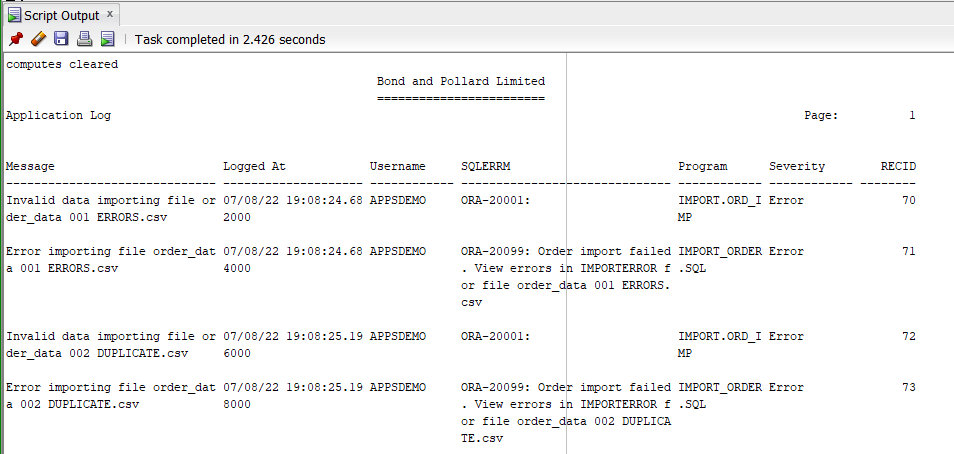
The demo application has an Application Log report (applog.sql) which lists the messages in the log, as shown below.
Debugging
Here's an example of embedding debug messages in a PL/SQL function. You may have multiple debug messages in your code, which you can turn on by setting v_debug_mode to 'S', and turn off by setting v_debug_mode to 'X'. This means you can keep the debug message code in place for future use, without the messages appearing.
WARNING: If your code must run quickly then do not leave live debug messages in: comment them out or remove them. Although log_message tests log_mode and exits if it is 'X', a processing overhead remains.
FUNCTION binary_search_rightmost(

    p_target   IN NUMBER,
    p_array    IN VARCHAR2,
    p_exact_match   IN BOOLEAN DEFAULT TRUE
  ) RETURN NUMBER
  IS
    ...

    v_debug_module applog.program_name%TYPE := 'util_numeric.binary_search_rightmost';
    v_debug_msg applog.message%TYPE;
    v_debug_mode VARCHAR2(1) := 'X';    -- <====== Change to S to display messages to screen, X to turn messages OFF

  BEGIN

    ...

    -- Find position of target t in array a
    WHILE l < r LOOP
      m := l + floor((r -l) / 2);

      v_debug_msg := 'In WHILE loop. m=' || to_char(m) || ' l=' || to_char(l) || ' r=' || to_char(r);
      util_admin.log_message(v_debug_msg, sqlerrm, v_debug_module, v_debug_mode, gc_info);

      IF a(m) > t THEN

        util_admin.log_message('a(m) > t THEN r:=m; m=' || to_char(m), sqlerrm, v_debug_module, v_debug_mode, gc_info);

        r := m;
      ELSE

        util_admin.log_message('ELSE l := m+1 =' || to_char(m+1), sqlerrm, v_debug_module, v_debug_mode, gc_info);

        l := m+1;
      END IF;
    END LOOP;


    v_debug_msg := ' EXIT LOOP '        ||
                   ' t=' || to_char(t)  ||
                   ' n=' || to_char(n)  ||
                   ' l=' || to_char(l)  ||
                   ' r=' || to_char(r)  ||
                   ' m=' || to_char(m);
    util_admin.log_message(v_debug_msg, sqlerrm, v_debug_module, v_debug_mode, gc_info);


    ...

    RETURN p;
  EXCEPTION
    WHEN OTHERS THEN

      util_admin.log_message('Unexpected error.', sqlerrm, v_debug_module, 'S', gc_error);

      RETURN NULL;
  END binary_search_rightmost;